BlockWord: Word Associations turns sorting into a genuinely pleasant brain break. You drag word and picture blocks onto category trays, clear groups of three, and ease through levels with zero time pressure. It is free, works offline, and earns the 4.9 rating it holds, as long as you do not mind a tutor hand you cannot dismiss.
At a glance
- Developer
- Pleasure City
- Platforms
- Android, iOS
- Players
- Single-player
- Language
- English
- Cost
- free
- Offline
- Yes
- Daily puzzle
- Yes
- Best for
- Casual
What we liked
- No timers, no fail states, fully at your own pace
- Blends vocabulary, logic, and picture matching
- Hundreds of handcrafted levels that ramp gently
- Offline play with hints when you get stuck
What we didn't
- No option to turn off the floating tutor hand
What is BlockWord: Word Associations?
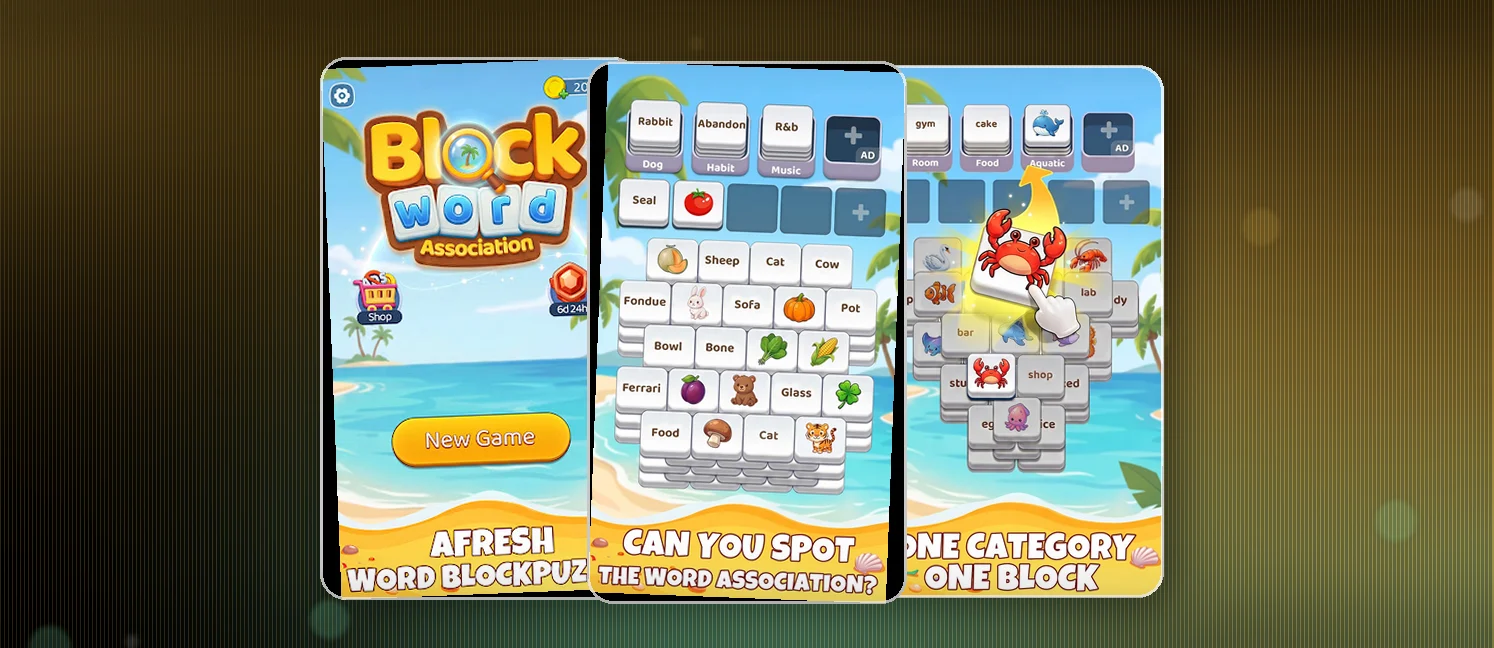
BlockWord: Word Associations is a word sorting puzzle from developer Pleasure City for Android. It holds a 4.9 rating from around 10K+ installs, which is impressive for a game this small. The pitch is simple: take scrambled word and image blocks and sort them into the right category trays.
The trays at the top work like Mahjong holders. Below them sits a shuffled pile of blocks, each carrying either a word like Cat or Glass or an icon of food, transport, or an activity. You drag each block onto the tray it belongs to, and every matching category fills out three at a time. Loose cards clear when their group completes. The loop is close to matching games you already know, but the word association layer gives it more depth than it first lets on.
How to win?
The win condition is straightforward: clear every category tray to finish the level. You never lose for being slow, because there are no timers and no penalties for a wrong placement. Success is about reading meaning rather than racing a clock.
- Place every block onto the category it matches
- Collect three correct blocks per category to clear that group
- Empty all trays to complete the level and open the next
Rules
The rulebook is short, which is part of the appeal. You sort, you clear, you move on. The subtlety lives in how a single word can fit more than one category, so you have to think rather than pattern-match.
- Each tray holds only blocks that genuinely belong together
- Three correct blocks in one category clears that group
- Blocks may carry a word, an image, or both
- No timers and no stress while you puzzle it out
- Hints exist for the moments you get fully stuck
Scoring Pattern
BlockWord does not run a visible scoring race, so the satisfaction is clearing groups cleanly and finishing levels. The real payoff is watching the board shrink as your categories complete.
- Completing a set of three clears that tray and frees the board
- Correct grouping builds toward clearing the level
- Difficulty climbs as categories begin to overlap
- Offline play means your progress and streaks carry on anywhere
What Players Say
Review sentiment runs about 75% positive to 25% negative, and the praise is warm. Relaxation is the headline theme, with players calling it relaxing and fun and recommending it for a great gaming experience. Others praise the graphics and fun factor so strongly that they feel a five-star cap undersells it, and one notes it both slows the mind for sleep and sharpens spelling in the same session.
The single recurring complaint is the tutorial. Players want the floating tutor hand gone, since they do not need coaching on how to play. It is a gripe about polish rather than the core design, and the main thing holding this back from a clean sweep.
On the App Store it holds 4.6 out of 5 from 1,278 ratings, and the recent iPhone reviews we sampled lean mixed (about 50% at 4 stars or higher). Where both stores agree — usually on ads, difficulty, or polish — treat it as the real consensus; where they differ, chalk it up to different player bases.
How to Set Up the Game
- Install BlockWord: Word Associations from Google Play, then open it
- Let the built-in tutorial walk you through the drag and drop basics
- Drag each word or image block onto the tray it matches
- Collect three per category to clear the group and advance
- Use hints if a level stalls, and play offline whenever you want
Is it on iPhone?
Yes — BlockWord: Word Associations is also on iOS as "BlockWord: Word Associations" by Orange One Limited, rated 4.6 out of 5 on the App Store. Your progress won't sync between the Android and iPhone versions unless the game offers its own account login, so treat them as separate installs.
- On iPhone instead? Grab "BlockWord: Word Associations" free from the App Store — same game, separate install.
FAQ
Is BlockWord free to play?
Yes. BlockWord is free to download and play, and it does not require an account to get going. Download it from Google Play and start sorting right away.
Does it work offline?
It does. Pleasure City lists offline play as a core feature, so no internet connection is needed once the app is installed. That makes it a solid pick for commutes and flights.
Is it good for kids?
Yes. Kids learn vocabulary through pictures, so the image blocks double as teaching tools. Adults get a logic challenge, and seniors get gentle mental exercise. The no-timer design keeps frustration low for younger players.
Is BlockWord: Word Associations available on iPhone?
Yes — it's on the App Store as "BlockWord: Word Associations", rated 4.6 out of 5 there.
Tips from the Geeks
- Scan the category trays before you start dragging so you know what each one collects
- When one word could plausibly fit two trays, place the more obvious match first and defer the ambiguous one
- Clear a nearly full tray before starting a fresh one to keep breathing room
- Use the picture icon as a hint when a word alone leaves you guessing
- Save the hint feature for over-the-top overlapping levels, because a clean solve is its own reward